Payments
Configure Stripe for payment processing in your application.
Create Stripe account
Sign up at stripe and complete the account setup.
Get API keys
Retrieve the API keys via the API page and copy the publishable and secret keys.
You can switch between live and test environments easily. Each key, product, subscription, client, etc is coupled to the environment you create them in. This will help you to define your local and your production environment.
Webhooks
To keep your database synchronized with subscription status and payment information, you need to configure webhooks.
Stripe can push real-time event data to your application's webhook endpoint when events happen in your Stripe account.
Receiving webhook events helps you respond to asynchronous events, such as when a customer's bank confirms a payment, a customer disputes a charge or a recurring payment succeeds.
Webhook for local development
If you want to test the payment integration locally, you can use the Stripe CLI. Follow the instructions to install it.
Run the following commands:
stripe login
stripe listen --forward-to localhost:3000/api/payment/webhook
Grab the webhook secret from the CLI output and keep it open to listen to events:
$ stripe listen --forward-to localhost:3000/api/payment/webhook
Checking for new versions...

A newer version of the Stripe CLI is available, please update to: v1.34.0
Getting ready...
Ready! You are using Stripe API Version [2025-12-15.clover].
Your webhook signing secret is whsec_90d2995f3fbead588b2846d59181efe5a089a5d8acd79a4f0e5fa77aBa6aazRa (^C to quit)
Add to local env
Add the following to your .env file:
STRIPE_SECRET_KEY=sk_test_xxxxxxxxxxxxxxxxxxxxx
STRIPE_PUBLISHABLE_KEY=pk_test_xxxxxxxxxxxxxxxxxxxxx
STRIPE_WEBHOOK_SECRET=whsec_xxxxxxxxxxxxxxxxxxxxx
Webhook for production
Create a webhook destination on the webhooks page.
Select events from "Your account" and select the following events:
checkout.session.completed (handles both subscriptions and one-time payments)customer.subscription.createdcustomer.subscription.updatedcustomer.subscription.deletedinvoice.paidinvoice.payment_failedpayment_intent.succeeded (optional, for one-time payments)payment_intent.payment_failed (optional, for one-time payments)
Select destination type webhook endpoint
Enter endpoint URL https://yourdomain.com/api/payment/webhook
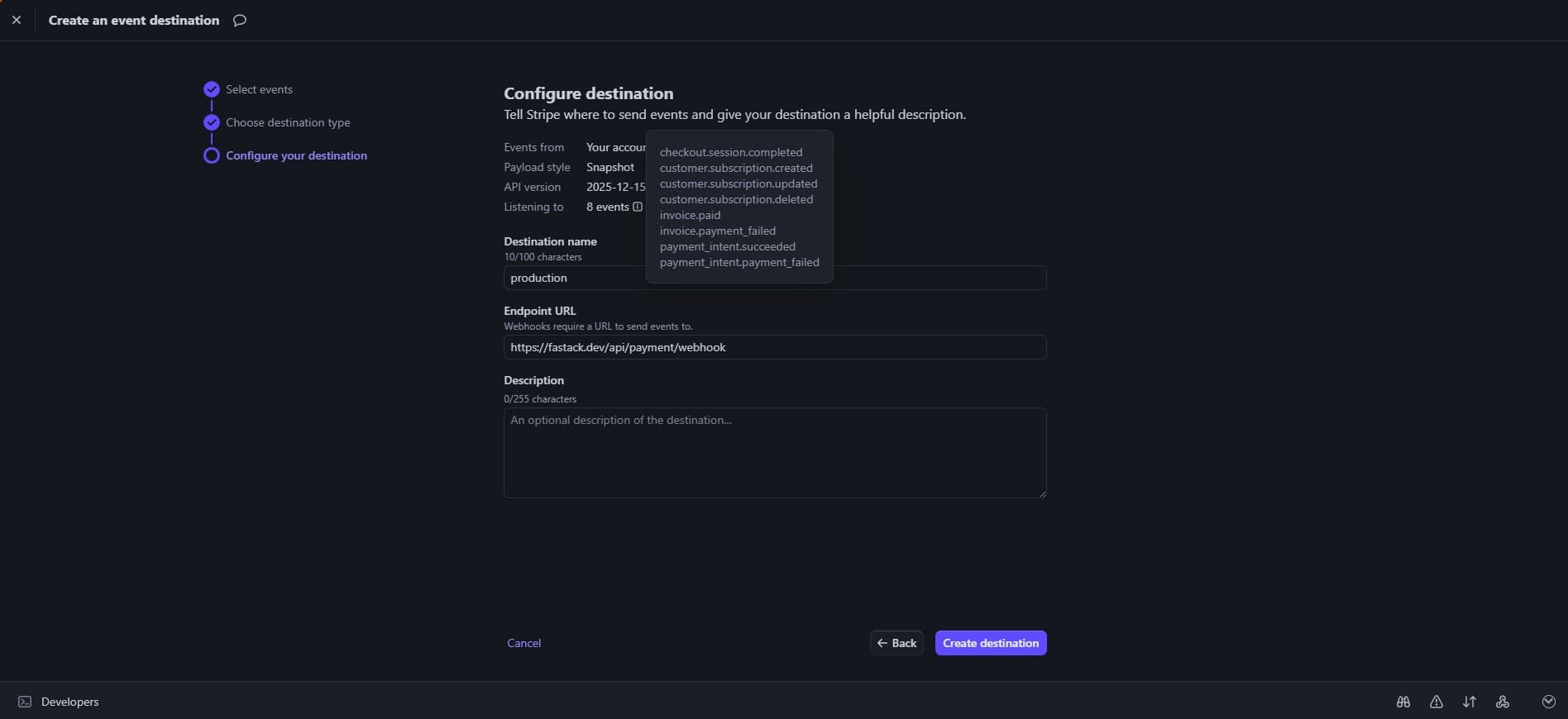
Copy webhook secret
Add to production env
Add the following to your .env.production file:
STRIPE_SECRET_KEY=sk_live_xxxxxxxxxxxxxxxxxxxxx
STRIPE_PUBLISHABLE_KEY=pk_live_xxxxxxxxxxxxxxxxxxxxx
STRIPE_WEBHOOK_SECRET=whsec_xxxxxxxxxxxxxxxxxxxxx